Completing the ITCP Compliance Checklist
Overview
The IAMTrusted Consumer Portal (ITCP) is focused on providing the moving consumer (private, corporate and government transferees) with curated information designed to help differentiate properly licensed, insured professional moving service providers. The ITCP leverages the IAM Mobility Exchange directory and its IAMX Validation system.
Only IAM Members who have earned IAMTrusted Mover (ITM) status are eligible to undergo the ITCP Compliance Check process in order to appear in the ITCP. Ongoing inclusion is voluntary but is a privilege which requires absolute adherence of the ITM to the IAM Code of Ethics, the IAMTrusted Mover Agreement and the guidelines of the IAMTrusted Consumer Issue Support System (CISS).
This guide is provided to help ITMs understand the options and how to complete their ITCP Compliance Checklist. Only company staff members who have been designated as IAMTrusted Administrators (ITM Admins) will have all the necessary permissions to make entries and edit their Company Profiles.
IAMTrusted Administrators (ITM Admins)
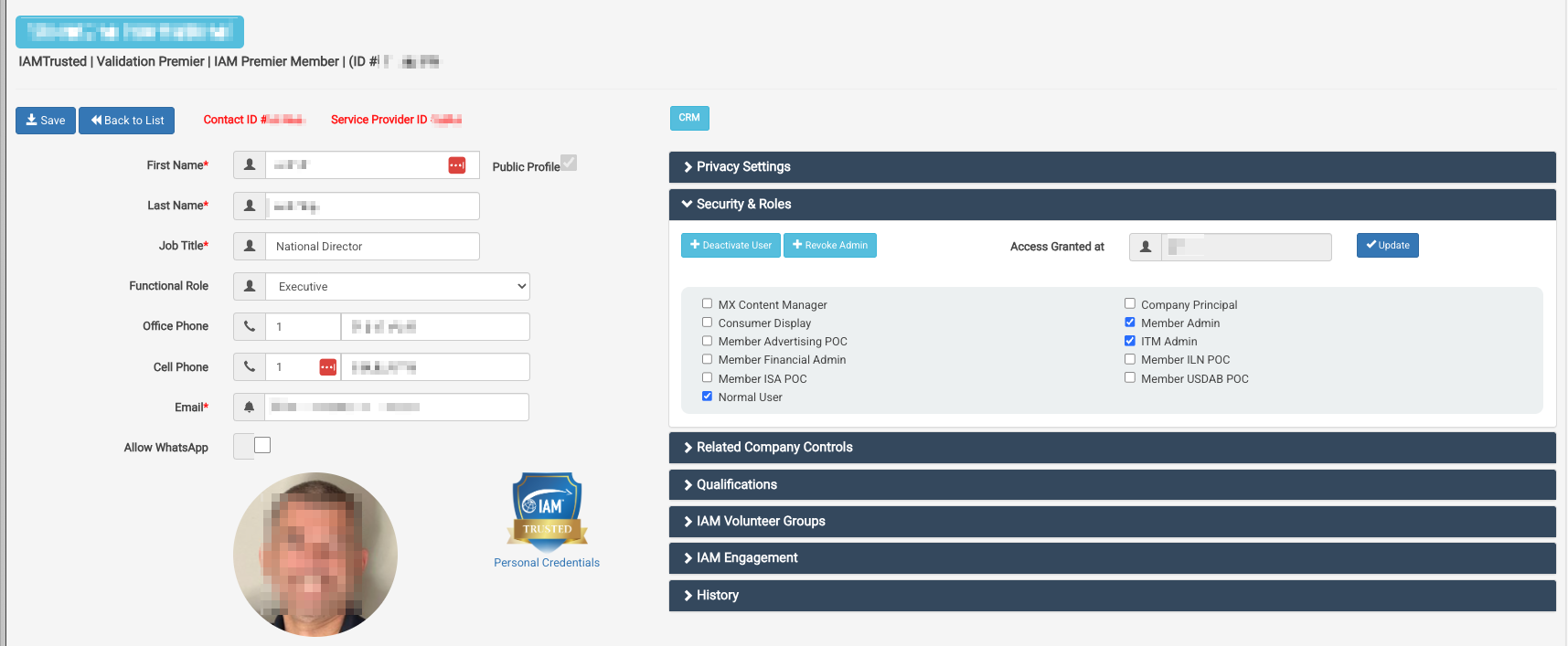
Each ITM must have at least one designated ITM Admin. ITM Admins are responsible for the communication relating to the ITM program, in particular the CISS. The ITM must ensure that email and contact information for the ITM Admin is current in their IAMX Contact Profile. Official communications regarding the ITM Program and CISS related communication will be considered delivered when properly sent by email.
For this reason, we strongly recommend that ITMs nominate at least one backup ITM Admin.
To nominate an ITM Admin, an executive or senior manager must contact support@mobilityex.com providing the Name, E-mail, and job title of the nominee.
Having at least one designated ITM Admin is a requirement for every ITM.
Geographic Scope
An ITM’s listing is based at the Main Address of its IAM Membership, as recorded in its IAMX Company Profile. The Main Address sets the ITM’s Country, Region (State/Province), City and geocode (latitude/longitude). When a consumer searches “Find Movers by Location” for an address or a city, the portal places a map pin at that location: the street address itself, or the center of the city as Google Maps defines it. Results are ordered by distance from that pin, so ITMs based nearby appear first. Local Scope listings appear only for ITMs within 100 miles of the pin. ITMs offering Long Distance or International Scopes can appear in searches outside their own area but within the country of their IAM Membership. Results for a state or country search are listed alphabetically.
ITMs may bring legally registered branch offices into IAM Membership under the IAM’s Branch Member Loyalty Program - IAM. Each IAM Branch member which meets the requirements of the ITM program may be featured in search results for their respective Location. Each branch must complete its own ITCP Compliance Check for its Location.
Service Scope
Each ITM may select the scope of service that they wish to feature in their ITCP listing. The Capabilities & Service Types section is found in the Company Profile.
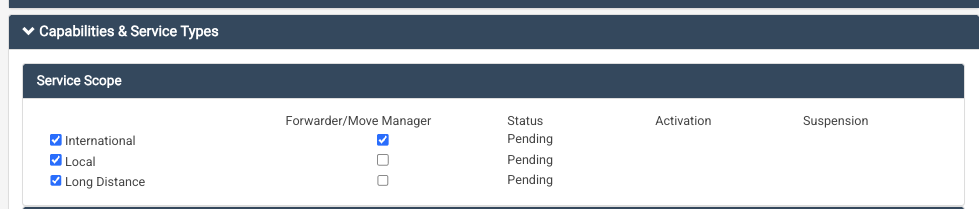
An ITM is considered an Asset Based Mover (with trucks, equipment and operational staff required for that scope of service) unless the Forwarder/Move Manager designation is checked. The Forwarder/Move Manager designation is checked when an ITM provides the scope of service as a non-Asset Based Forwarder/Move Manager. It is assumed that Asset Based Movers may also act as Forwarders/Move Managers when circumstances warrant.
When an ITM acting as a Forwarder/Move Manager subcontracts transport or other services, they must use suppliers that hold the licenses and insurance required by law for the work they perform.
The Forwarder/Move Manager setting for each scope determines which items appear in the ITCP Compliance Checklist for that scope. Requirements that apply only to companies operating their own vehicles, such as vehicle licenses and motor vehicle liability insurance, are not asked of Forwarder/Move Managers. For Local and Long Distance Scopes, a broker or forwarder license required by the jurisdiction is documented only by Forwarder/Move Managers; an Asset Based Mover that arranges moves performed by other carriers confirms in its Affirmation that it holds any broker or forwarder license the law requires. For International Scope, any forwarder, freight agency or multimodal operator license the jurisdiction requires applies to all ITMs, Asset Based or not, because international movers arrange the international carriage.
In the United States, IAMTrusted also requires every Asset Based ITM to carry workers’ compensation insurance covering all employees, even where state law exempts the employer. This is an IAMTrusted requirement rather than a legal one, and it does not apply to Forwarder/Move Managers.
IAMTrusted Compliance Pages
The IAM has curated IAMTrusted Compliance Pages for each jurisdiction where ITMs operate. They can be found at About Licensing & Compliance | IAM Consumer Portal
At the bottom of each Compliance Page, the licensing, insurance and operational requirements for that jurisdiction are summarized.
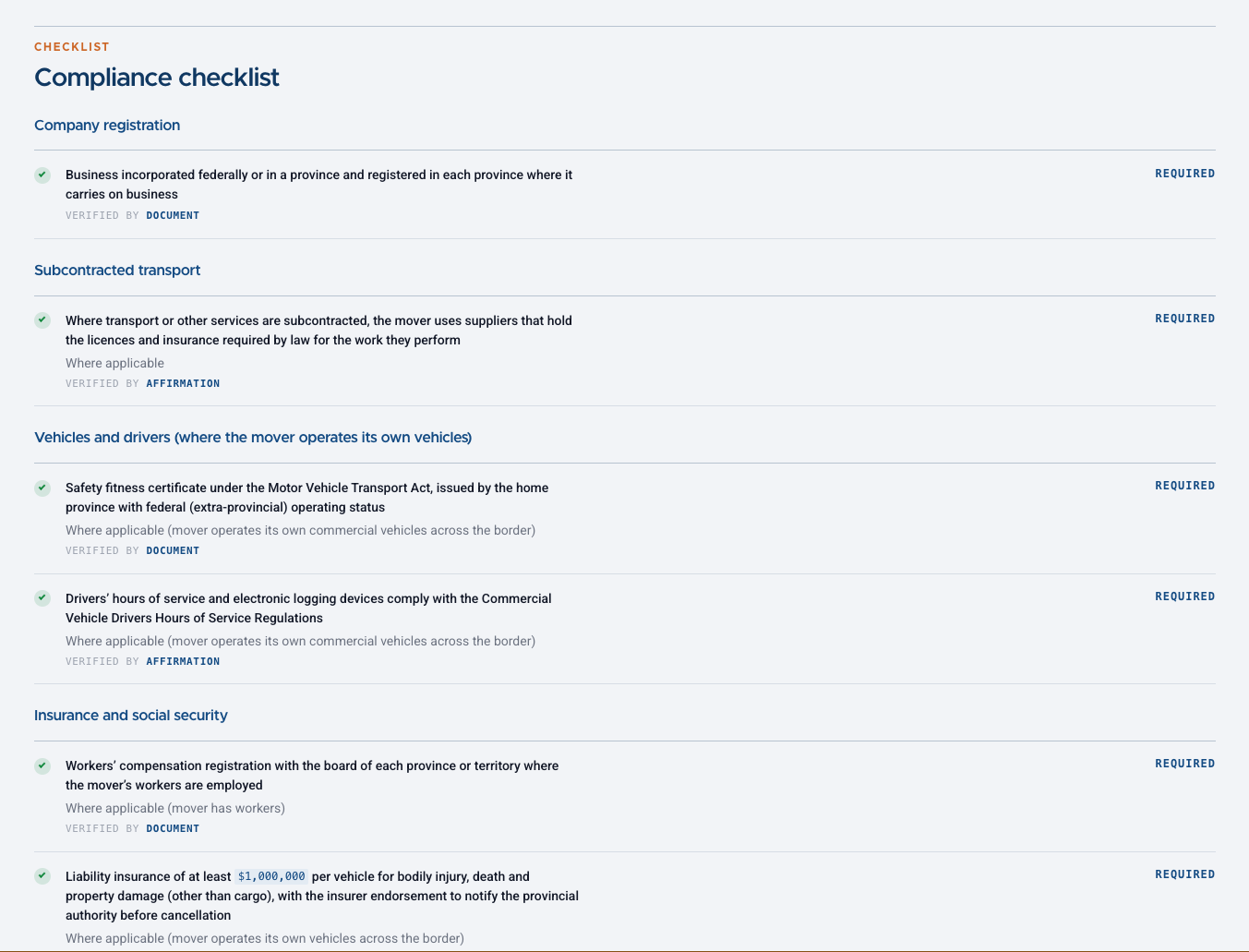
Compliance Pages are added as ITMs are accepted in new jurisdictions. If there is no Compliance Page for your jurisdiction, contact support@mobilityex.com before you begin.
The ITCP Compliance Matrix
The ITCP Compliance Matrix is structured using these three elements:
- Geographic Scope
- Service Scope
- Compliance Page Requirements
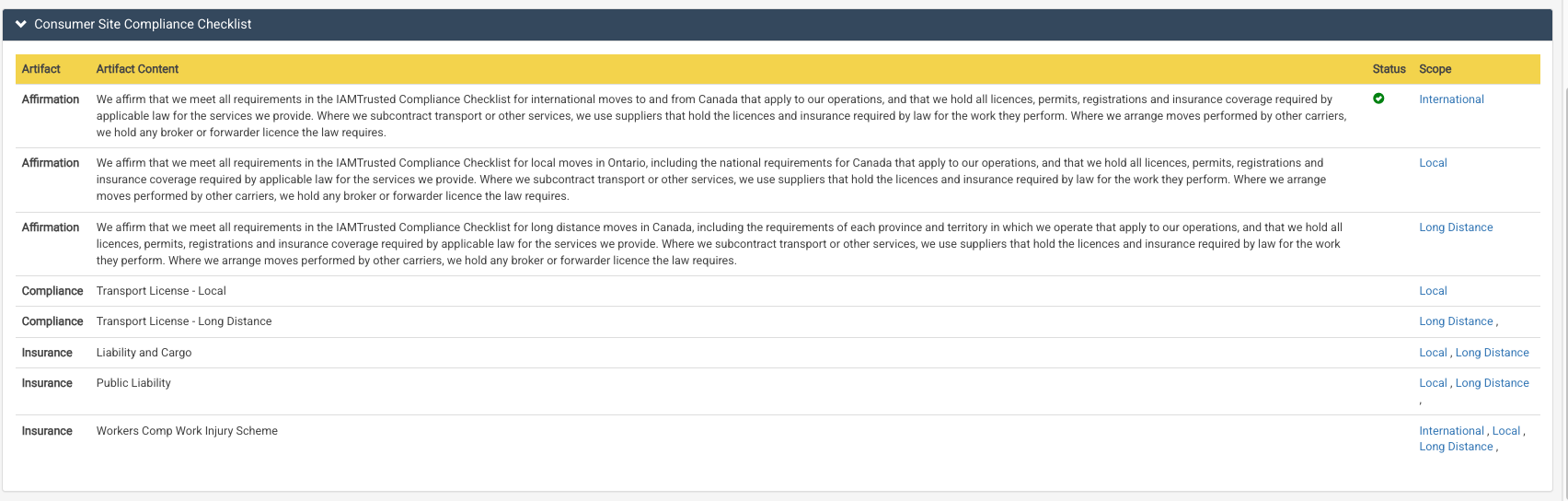
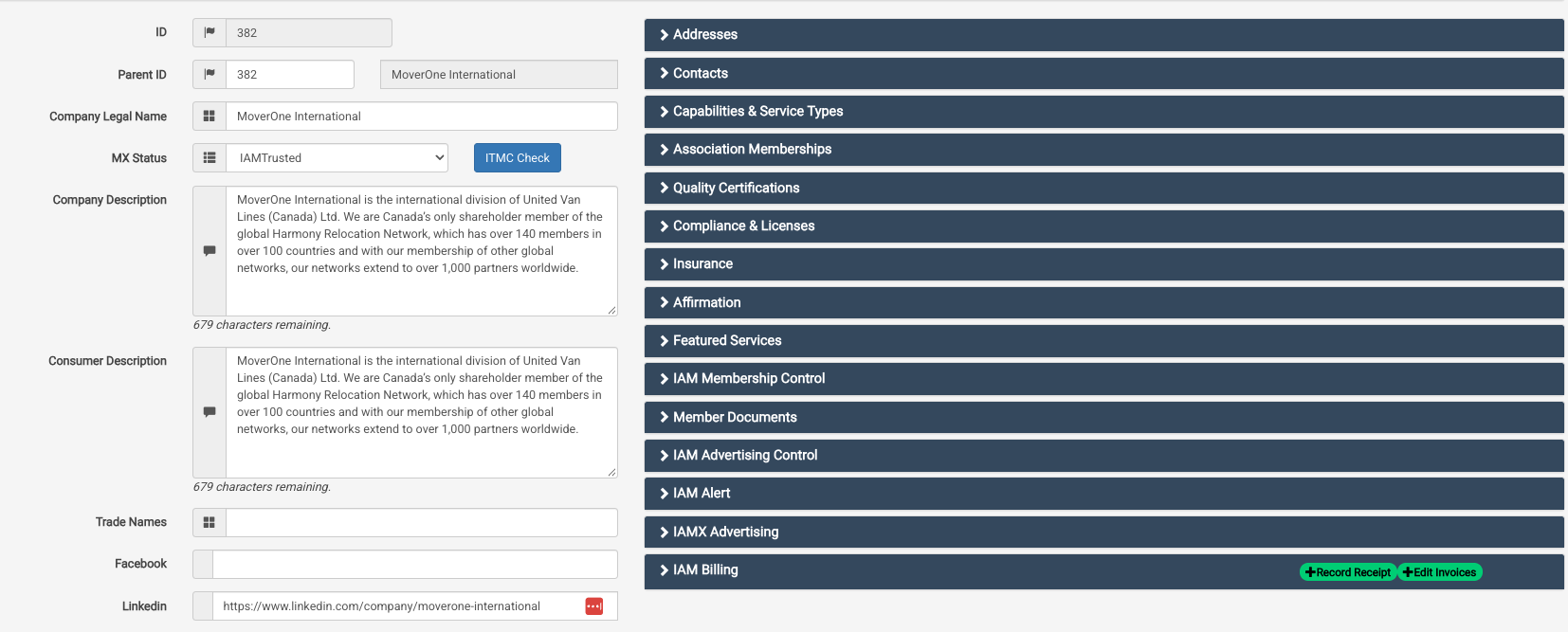
Documenting compliance will be done under the Compliance & Licenses, Insurance and the Affirmation sections. These can be found in the right-hand section of the Company Profile.
Each Compliance Page lists every legal requirement for its jurisdiction. To keep the documents ITMs collect and maintain to a small, consistent set, only the qualifications below are documented by upload. Every other requirement, such as vehicle registration and inspection, driver licensing, tax registration, tariffs and consumer practices, is covered by the Affirmation for that scope. If a Compliance Page shows a requirement as verified by document and it does not match one of these qualifications, it is covered by your Affirmation.
| Section | Qualification | What it holds |
|---|---|---|
| Compliance & Licenses | Transport License - Local, Long Distance or International | The jurisdiction’s transport operating license or mover authority for that scope |
| Compliance & Licenses | Transport License - Forwarder | Broker, freight forwarder, freight agency, multimodal operator, ocean intermediary and air forwarder licenses |
| Compliance & Licenses | DOT | USDOT number (United States) |
| Compliance & Licenses | FMC | Federal Maritime Commission license or registration (United States) |
| Insurance | Liability and Cargo | Liability and cargo insurance required by the jurisdiction |
| Insurance | NVOCC and Forwarder | Insurance a jurisdiction requires of NVOCCs and ocean freight forwarders |
| Insurance | Public Liability | Motor vehicle third-party liability insurance |
| Insurance | Surety Bond | Surety bonds or financial guarantees required by the jurisdiction, including the bond the US Federal Maritime Commission (FMC) requires of NVOCCs and ocean freight forwarders |
| Insurance | Workers Comp Work Injury Scheme | Workers’ compensation insurance, or registration in a statutory work injury or social security scheme such as IMSS (Mexico) or IGSS (Guatemala) |
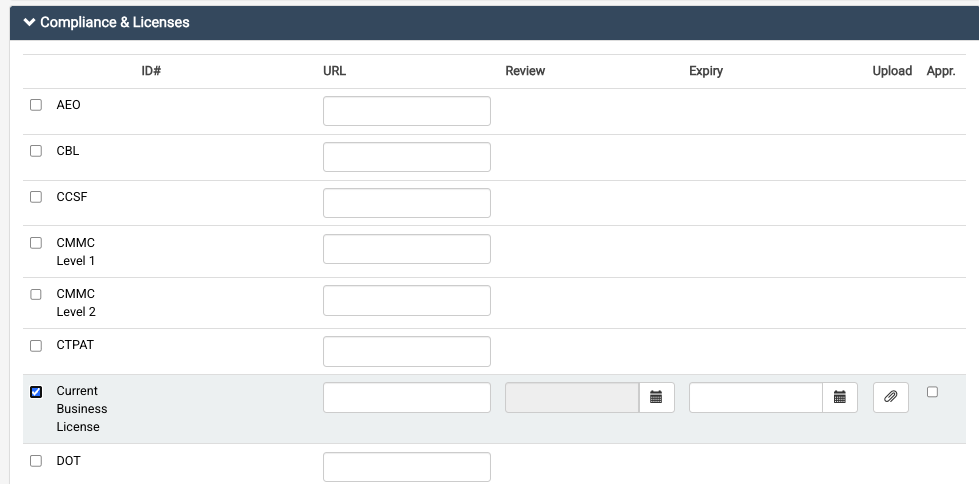
Three further requirements apply to every ITM, whatever its jurisdiction or scope of service: a current Business Registration, documented as the Current Business License in the Compliance & Licenses section, at least one designated ITM Admin and affirmation of the IAMTrusted Mover Agreement. These appear in the ITCP Compliance Checklist separately from the requirements for each scope, and must be complete before the ITM can appear in the ITCP for any scope.
In the Compliance & Licenses section, for example, the Current Business License can be checked which will permit a document to be uploaded (click the paperclip). Enter the document’s expiration date. If the document has no expiration date, the system sets a review date 180 days in the future, when the Validation Team reconfirms that the qualification remains in effect, for example by checking the issuing authority’s online license lookup.
The ID# and URL fields are used only where IAMX integrates with, or can link to, the issuing organization. For example, a USDOT or FMC number links directly to that agency’s database and displays the current status of the qualification. Most ITCP qualifications do not use these fields.
Documents must be in PDF, JPG or PNG format and smaller than 4 MB, and each qualification accepts one document. A document should be legible, issued in the company’s legal name as shown in its IAMX Company Profile, and cover the jurisdiction and scope of service it is submitted for. Documents may be submitted in the local language and are displayed as submitted. If you have any difficulty uploading, email the document to support@mobilityex.com and we will be happy to assist.
Once the document is uploaded, the Validation Team reviews it and, if it is accepted, approves the qualification. This places a green tick mark in the ITCP Compliance Checklist next to that qualification. Once all tick marks are complete for a scope of service, the ITM is approved to appear in the ITCP for that scope. If a document needs to be corrected or replaced, the Validation Team will correspond with the ITM Admin and work with the ITM until the document is acceptable.
Insurance
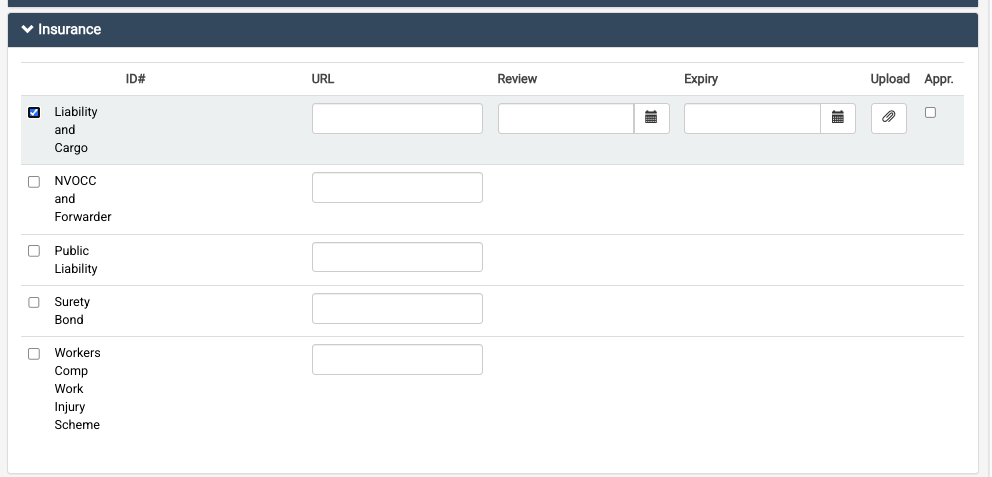
A copy of the insurance certificate or policy cover page showing the coverage and the expiration date for the policies specified in the ITCP Compliance Checklist can be uploaded in the Insurance section. You can always send the document to support@mobilityex.com; we are happy to upload and complete validation.
Affirmations
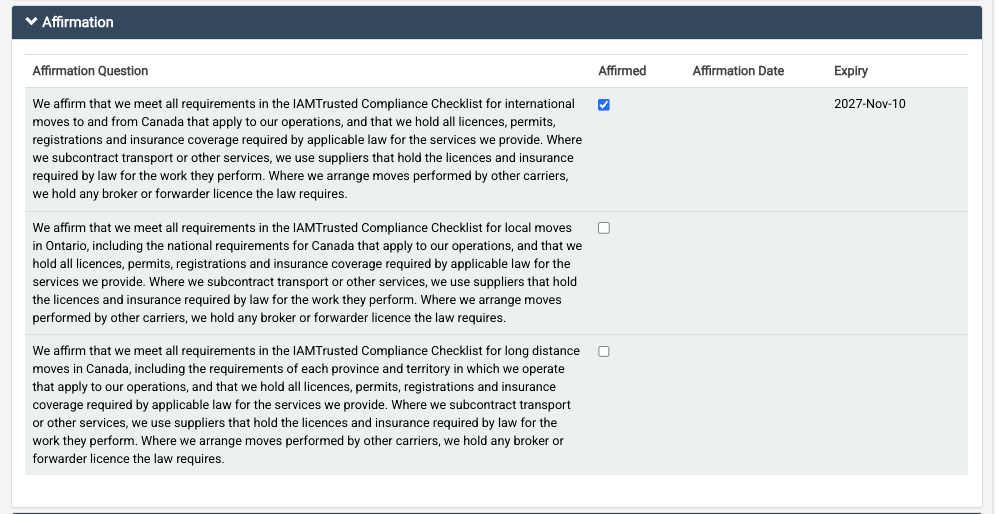
Requirements that cannot easily be documented by upload are covered by an Affirmation. Each scope of service in each jurisdiction has its own Affirmation. The Affirmation for Local service also covers the national requirements that apply, and the Affirmation for Long Distance service covers the requirements of each state, province or region in which the ITM operates.
By checking an Affirmation, the ITM Admin confirms on behalf of the company that it meets every requirement in the ITCP Compliance Checklist for that scope that applies to its operations, including requirements not documented by upload. The Affirmation also confirms that the company uses suppliers that hold the licenses and insurance required by law for any work it subcontracts, and that it holds any broker or forwarder license the law requires where it arranges moves performed by other carriers. Only an ITM Admin with authority to make this commitment for the company should check an Affirmation.
The system records the date of the Affirmation and sets an expiry date 365 days later. The Affirmation must be renewed before it expires. If the wording of an Affirmation changes, ITMs may be asked to affirm again.
In addition to the Affirmation for each scope, every ITM affirms the IAMTrusted Mover Agreement. This is one of the three requirements that apply to every ITM, whatever its jurisdiction or scope of service. The Affirmation reads:
“We affirm that we have read and agree to the terms of the IAMTrusted Mover Agreement, and that we will comply with it for as long as we hold IAMTrusted Mover status. We understand that failure to comply may result in removal from the IAMTrusted Consumer Portal.”
Like the scope Affirmations, it expires 365 days after it is affirmed and must be renewed before then.
When an ITM Admin checks an Affirmation, the system records that user’s credentials and the date. Read each Affirmation carefully and check it only if you agree with the statement.
Company & Consumer Description
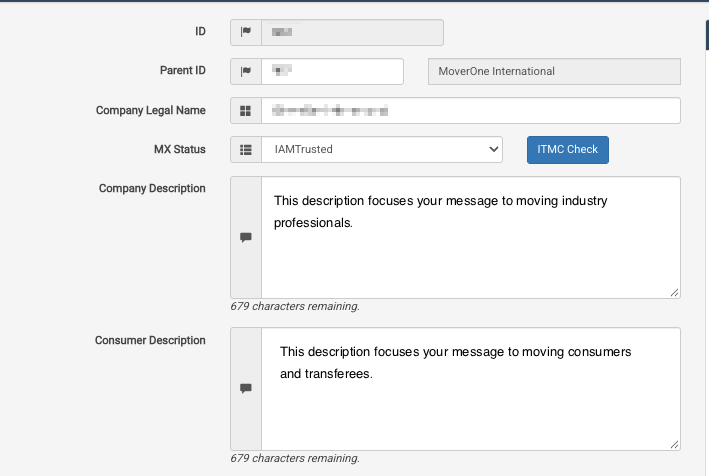
The Company Profile now has two description fields. The Company Description appears in the IAM Mobility Exchange (IAMX) directory, which serves professional industry users.
The Consumer Description appears in the ITCP, which serves moving customers and transferees. This lets each ITM write a description suited to each audience.
Each description can hold up to 1,000 characters.
Listing Status
The Service Scope panel under Capabilities & Service Types shows the Status, Activation and Suspension of each scope. A scope remains Pending until every item in its ITCP Compliance Checklist, including the three requirements that apply to every ITM, has a green tick mark. When the last item is approved, the scope is activated and the ITM appears in the ITCP for that scope.
If any qualification or Affirmation for a scope expires or lapses, its tick mark is removed and the ITM’s listing for that scope is taken down from the ITCP until the item is renewed and approved. A qualification that applies to more than one scope, such as workers’ compensation insurance, affects each of those scopes. The system sends reminders before qualifications and Affirmations expire. To avoid a gap in your listing, upload renewed documents and renew Affirmations before they expire.
An ITM is also removed from the ITCP for failure to abide by the IAMTrusted Mover Agreement, the CISS guidelines, the IAM Code of Ethics or the guidelines of the IAM Issue Resolution System (IIRS), which supports the resolution of issues between IAM Members.
Keeping Your Listing Current
ITMs are responsible for keeping their qualifications current. Notify support@mobilityex.com promptly of any change that affects a qualification, such as the cancellation or reduction of an insurance policy or the suspension or revocation of a license. IAMX staff may review an ITM’s qualifications at any time and may ask for updated documents.
Uploaded documents are public. In ITCP search results, each ITM’s company card has a View Qualifications option that displays its approved qualifications and links to the documents. Before uploading, remove or redact any personal or confidential information that is not needed to show the qualification, while keeping the company name, coverage, dates and issuing authority visible.
Getting Help
For help with any part of the ITCP Compliance Check, contact support@mobilityex.com.